Temporary Email
A temporary email is a disposable inbox designed for short-term use, shielding your primary email from spam, data breaches, and unwanted marketing. It’s a powerful, free tool for maintaining online privacy when registering on untrusted sites or downloading content. However, understanding its limitations and proper use cases is crucial to avoid missing important communications.
Have you ever hesitated to sign up for a free webinar, download a useful ebook, or access a software trial because it required your email address? You knew deep down that your inbox would soon be flooded with promotional newsletters and spam. This common dilemma is exactly where a temporary email becomes your digital best friend. It’s a simple, clever, and free tool designed for one primary mission: to receive that one verification email or download link and then vanish without a trace, leaving your primary email pristine and spam-free.
Think of a temporary email as a burner phone for your online identity. You wouldn’t give out your personal phone number to every sketchy survey company, right? You’d use a disposable number if you had to. The same logic applies to your email address, which is often the key to a cascade of personal data. In this guide, we’ll unpack everything you need to know about using disposable inboxes—how they work, why they’re useful, the hidden risks, and the smart strategies to use them effectively. By the end, you’ll know exactly when to reach for a temporary email and when to keep your primary address private.
Key Takeaways
- Privacy Shield: A temporary email acts as a protective barrier, preventing spam and data harvesting from reaching your permanent inbox.
- Short-Term Tool: It is ideal for one-time sign-ups, verification, or downloads where long-term communication is not expected.
- No Account Recovery: Never use a disposable address for critical accounts (banking, social media) as you will lose access permanently.
- Security Awareness: While it hides your real email, the temporary inbox itself may not be encrypted; avoid sending sensitive data through it.
- Provider Variability: Features, lifespan, and security differ significantly between temporary email services.
- Legal & Acceptable Use: Using a temporary email is legal, but violating a website’s terms of service by using it where a real email is required can have consequences.
- Not for Everything: Its purpose is specific misuse; for ongoing subscriptions or professional contact, a dedicated email is necessary.
[FEATURED_IMAGE_PLACEHOLDER]
📑 Table of Contents
- What Exactly Is a Temporary Email?
- The Primary Benefits: Why Use a Disposable Inbox?
- The Risks and Limitations: What You Must Know
- Practical Use Cases: When to Reach for a Disposable Address
- Choosing a Temporary Email Service: Features to Compare
- Best Practices for Safe and Effective Use
- The Future of Disposable Email and Digital Identity
- Conclusion: A Smart Tool for a Specific Job
What Exactly Is a Temporary Email?
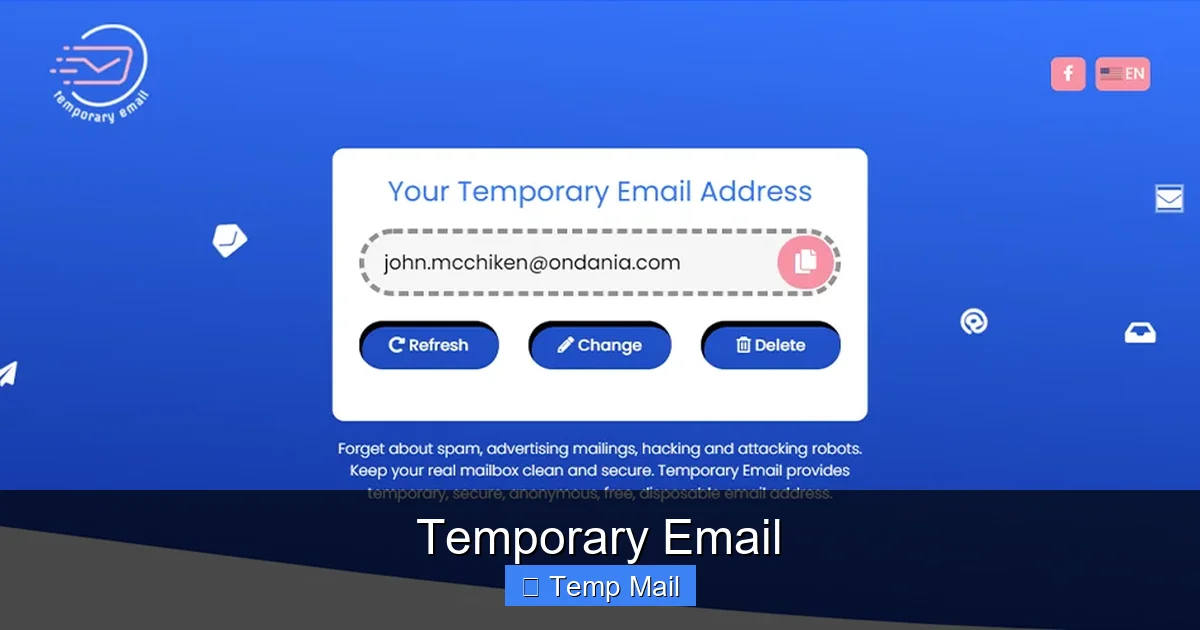
A temporary email, also called a disposable email, throwaway email, or fake email, is a service that provides you with a random, functioning email address for a very short period—typically a few minutes to a few hours. These addresses are generated automatically on the service’s website. You don’t need to create an account or set a password. You simply visit the site, get your new address, and use it wherever you need a temporary inbox.
The Core Mechanism: How It Works Instantly
The magic lies in the backend. When you visit a site like Temp-Mail.org or 10MinuteMail.com, their system instantly creates a new, unique mailbox on their server. This mailbox is associated with a random string of characters (e.g., abc123@tempmail.net). The inbox is publicly accessible via a specific URL that contains a unique token, or sometimes just by refreshing the page. Any email sent to that address is routed to this temporary inbox and displayed on your browser tab. Once the time limit expires (or you manually delete it), the entire mailbox—along with all its contents and the address itself—is permanently wiped from the server. It’s gone forever.
The Primary Benefits: Why Use a Disposable Inbox?
The rise in popularity of temporary email services isn’t accidental. They solve a very real and growing problem: inbox overload and privacy erosion. Let’s explore the key advantages.
Visual guide about Temporary Email
Image source: paced-email.imgix.net
1. Spam Prevention and Inbox Hygiene
This is the number one reason people use disposable emails. When you use your primary Gmail or Outlook address to sign up for a service you’re skeptical about, you’re essentially giving that company permission to add you to their marketing list. Even if you unsubscribe later, your email address may have already been sold to third-party advertisers or involved in a data breach. A temporary email contains this risk. The spam goes to a burner address that will self-destruct, keeping your main inbox clean and organized for important personal and professional correspondence.
2. Enhanced Privacy and Data Protection
Every website you register with collects data. Your email address is a primary identifier that can be cross-referenced across data brokers to build a detailed profile of your online behavior. By using a temporary email, you break this chain of data aggregation. You interact with a service without revealing your true identity. This is particularly valuable when accessing content in regions with heavy surveillance, researching sensitive topics, or simply wanting to limit your digital footprint. It’s a small but significant step towards taking back control of your personal information.
3. Bypassing Registration Walls
The internet is full of “gated content.” Want to read that in-depth industry report? Download that free software? Watch that exclusive video? Often, the only barrier is an email address. A temporary email lets you effortlessly bypass these registration walls. You get instant access to the content or tool you need without committing to a long-term relationship with the publisher. It’s a fantastic way to sample services, gather research, or obtain one-time resources without consequence.
4. Avoiding Unwanted Newsletters and Promotions
Even reputable companies can be aggressive with their email marketing. What starts as a useful newsletter can become a daily clutter of promotions. Using a temporary email for initial sign-ups means you never have to deal with the “unsubscribe” link dance. The promotional emails will land in an inbox that ceases to exist in an hour. You get the initial benefit (the download link, the access code) and none of the long-term marketing baggage.
The Risks and Limitations: What You Must Know
While powerful, a temporary email is not a magic bullet for all your email needs. Using it incorrectly can lead to real problems. Understanding its limitations is just as important as knowing its benefits.
Visual guide about Temporary Email
Image source: htmlemailtemplates.net
1. The Inherent Lack of Permanence
This is the defining feature and the biggest risk. Once the inbox expires, it’s unrecoverable. Any emails sent after that time are lost forever. This means you can never use a temporary email for any account where you might need to reset a password, receive billing statements, or get important account updates. If you use it to sign up for a social media platform, a cloud storage service, or an online bank, you will be locked out the moment you need that verification email. It is strictly for transient interactions.
2. Security and Encryption Concerns
Most free temporary email services operate on HTTP (not HTTPS) or have limited security. While the email is in transit and at rest on their server, it may not be encrypted. This means someone with the right technical skills (like a hacker on the same public Wi-Fi) could potentially intercept or read the emails. Furthermore, the provider themselves could theoretically read the contents. Therefore, never use a disposable address to send sensitive information like passwords, credit card numbers, Social Security numbers, or confidential documents. It’s for receiving low-stakes verification emails, not for secure communication.
3. Blocking by Major Platforms
Many major, high-security platforms actively block known temporary email domains. Google, Facebook, Apple, Microsoft, and most banking or payment processors (PayPal, Stripe) will reject a disposable address during sign-up. They do this to prevent fraud, spam, and abuse. If you try to create a Google Account with a temporary email, it simply won’t work. This is a good thing—it’s a built-in safeguard—but it limits where you can use these services. They are best suited for smaller websites, forums, blogs, and download portals.
4. No Sending Capability (Usually)
The vast majority of temporary email services are receive-only. You cannot compose and send emails from your disposable address. This is by design, as it prevents spammers from using the service to send bulk mail. Your ability is limited to receiving the one or two emails you need for the specific task at hand.
Practical Use Cases: When to Reach for a Disposable Address
Knowing the theory is one thing; knowing when to apply it is another. Here are clear, practical scenarios where a temporary email is the perfect tool.
Visual guide about Temporary Email
Image source: htmlemailtemplates.net
Downloading Gated Content
This is the classic use case. You find a fantastic whitepaper, a useful template, or a free piece of software, but the website demands an email address to download it. Use your disposable address. You’ll get the download link in the temporary inbox, grab the file, and the address dies. No follow-up spam about “upgrading to the premium version.”
Signing Up for Online Forums or Comment Sections
You want to contribute to a discussion on a news site or a hobby forum, but you don’t want that site owning your email. Use a temporary email. You get your account confirmation, make your comment or post, and never think about that forum again. Your primary email remains unlinked to that potentially controversial or data-hungry community.
Testing Website or App Functionality
If you’re a developer, tester, or just a curious user, you might need to test a registration flow or an email-based feature. Creating dozens of real email accounts is a hassle. A temporary email service allows you to generate a new inbox instantly for each test case, streamlining quality assurance and experimentation.
Accessing Public Wi-Fi or Shared Computers
Using a library or café computer to access a service that requires email verification? Don’t type in your personal credentials on a machine you don’t trust. Use a temporary email for the sign-up. It’s a safer practice that limits exposure if the public computer has keylogging software.
One-Time Promotions and Discounts
See a “get 10% off your first purchase” offer that requires email sign-up? If you plan to make that one purchase and never shop there again, a disposable address is perfect. You get the discount code, use it, and the promotional emails go to a dead inbox.
Choosing a Temporary Email Service: Features to Compare
Not all temporary email services are created equal. While they all share the core disposable concept, features, usability, and reliability vary. Here’s what to look for.
Inbox Lifespan and Auto-Refresh
Some services give you 10 minutes (like the classic 10MinuteMail), others offer 1 hour, 24 hours, or even until you close the browser tab. Consider your task. For a quick download, 10 minutes is plenty. For a process that might take longer (like a multi-step verification), a 1-hour or 24-hour window is safer. Look for services with an auto-refresh feature so you don’t have to manually reload to see new emails.
Domain Variety and Customization
Some providers offer only one domain (e.g., @tempmail.com). Others offer dozens of domains you can choose from. This can be useful if a particular website is blocking emails from a known disposable domain. Some advanced services even let you create a custom inbox name (e.g., yourname@disposable.com) within their domain, which is more memorable than a random string.
User Interface and Experience
A cluttered, ad-heavy site with pop-ups is a headache. Look for a clean, simple interface that clearly displays the inbox, the current email address, and the countdown timer. The ability to copy the address with one click is a small but significant quality-of-life feature.
Security Claims (HTTPS)
Always check if the service’s website uses HTTPS (the padlock icon in your browser). This encrypts the connection between your browser and their server, protecting the emails you view from eavesdropping on your network. While it doesn’t encrypt the emails at rest on their server, HTTPS is a basic security requirement you should expect.
Popular Service Examples
Well-known names in this space include Temp-Mail, 10MinuteMail, Guerrilla Mail, and Mailinator (which offers both public and private modes). Each has its own strengths in terms of lifespan, domain options, and interface. It’s worth trying a couple to see which one fits your workflow best.
Best Practices for Safe and Effective Use
To get the most out of temporary email while staying safe, follow these practical guidelines.
- Always Assume the Inbox is Public: The URL to your temporary inbox is often the only thing protecting it. Do not share this URL with anyone. Anyone with the link can see the emails. Close the browser tab when finished.
- Use a Different One Every Time: Don’t reuse the same disposable address for multiple sites. The whole point is to create a new, unlinked identity for each interaction. Reusing one defeats the privacy purpose.
- Check the Lifespan Before You Start: Glance at the countdown timer when you get your address. If you expect the verification email might take 15 minutes, but the inbox only lasts 10, you’ll miss it. Choose a service with a suitable lifespan for your task.
- Never Use for Critical Accounts: Reinforcing the earlier point: absolutely do not use a temporary email for any account you need to log into regularly, recover, or that contains financial or deeply personal information. This includes email service providers themselves, cloud storage, banking, and primary social media.
- Clear Your Browser Data: After using a disposable email on a public or shared computer, be sure to clear your browser history, cookies, and cache. This removes the session and prevents the next user from accessing the same temporary inbox via the browser history.
- Have a Primary Email Ready: The disposable address is a tool for specific jobs. For everything else—your actual subscriptions, professional contacts, and account logins—use a reputable, secure, and permanent email service with strong privacy policies and two-factor authentication enabled.
The Future of Disposable Email and Digital Identity
The pressure on email privacy is only increasing. As data breaches become more common and regulations like GDPR and CCPA give users more rights, the demand for tools like temporary email will grow. We may see these services evolve, potentially integrating with password managers or privacy-focused browsers as a seamless one-click option during sign-up flows. However, the cat-and-mouse game with websites trying to block disposable domains will also continue. Some services are already using more sophisticated techniques, like rotating domains or using less obvious domain names, to stay ahead of blocks.
The bigger trend is towards email aliasing—a more robust cousin to the temporary email. Services like SimpleLogin, AnonAddy, or DuckDuckGo’s Email Protection let you create unlimited, unique, forwardable email aliases that all deliver to your one primary inbox. You can delete an alias at any time, stopping all future emails from that sender. This offers the privacy benefits of a disposable address but with the convenience of a single, permanent inbox. It represents the next step in managing your digital identity: not just hiding your email, but controlling the flow of information into it dynamically.
Conclusion: A Smart Tool for a Specific Job
A temporary email is not a replacement for your primary email address. It is not the tool for building your digital reputation or maintaining long-term connections. Instead, it is a tactical instrument for the modern web—a shield against the relentless tide of spam and a cloak for your personal data when engaging in low-stakes, one-off online activities.
Used wisely, it keeps your main inbox pristine, protects your identity from data harvesters, and grants you frictionless access to the resources you need. The key is discipline: recognizing the right moment to use it, understanding its inherent limitations, and never compromising your essential online accounts for the sake of convenience. In an ecosystem where your email address is a valuable commodity, treating it with the same caution you would your physical mailing address is just common sense. The temporary email is that common sense, digitized and ready in a browser tab. Use it, and take back a small but meaningful piece of your online privacy.
Frequently Asked Questions
Is using a temporary email illegal?
No, using a temporary email service is completely legal. It is a legitimate tool for privacy protection. However, using it to fraudulently sign up for a service that explicitly requires a real, verifiable email address may violate that website’s Terms of Service, which could result in a banned account.
Can I send emails from a temporary email address?
Almost never. The vast majority of temporary email services are receive-only. This is a deliberate design to prevent spammers from exploiting the service to send bulk or malicious emails. Their function is solely to allow you to receive a single verification or download link.
Are temporary emails secure for receiving sensitive information?
No. You should never rely on a temporary email for receiving sensitive data like password reset links for important accounts, financial statements, or confidential documents. The inboxes are often unencrypted, the provider can potentially access the emails, and the address is publicly accessible via its unique URL.
How long does a temporary email last?
The lifespan varies by provider. Common durations range from 10 minutes to 24 hours. Some services keep the inbox active as long as your browser tab remains open. Always check the countdown timer on your chosen service to know exactly when your inbox and address will be permanently deleted.
Why would a website block a temporary email?
Websites, especially larger platforms, block known disposable email domains to combat fraud, spam, and abuse. It prevents users from creating multiple anonymous accounts to game a system, post spam, or evade bans. It also helps ensure users provide a real, contactable email for account recovery and important communications.
What should I do if a verification email doesn’t arrive in my temporary inbox?
First, check the spam/junk folder within the temporary inbox interface, as some filters misclassify these emails. Next, ensure you copied the disposable address correctly and that the website accepted it. If there’s still no email after a few minutes, the website may have blocked the disposable domain. In that case, you’ll need to use a different email service or your primary address if the site is trustworthy.