Temp Mail for Verification
Temp mail for verification is your secret weapon against spam and data harvesting. It provides a free, disposable email address that expires after use, letting you bypass mandatory sign-up forms without exposing your primary inbox. This simple tool safeguards your privacy and keeps your main email clean from promotional clutter.
You’re clicking through the internet, trying to access a useful article, download a free ebook, or join a forum discussion. Suddenly, a wall appears: “Please enter your email address to continue.” You sigh. That’s your personal inbox they want, destined for a torrent of newsletters, promotions, and who knows what else. This is the universal modern frustration. But what if you could simply wave a magic wand, provide an email that goes *poof* after you’re done? That’s the promise of temp mail for verification. It’s not a shady hack; it’s a straightforward, practical tool for taking back control of your digital footprint, one disposable inbox at a time.
In this complete guide, we’re going to demystify everything about temporary email services. We’ll explore exactly how they work, why they’re a privacy essential for many everyday tasks, the critical risks you must understand, and how to use them wisely without shooting yourself in the foot. Think of this as your friendly, no-nonsense handbook to navigating the web without sacrificing your inbox peace.
Key Takeaways
- Privacy Shield: Temp mail creates a barrier between your real identity and online services, preventing your primary email from being sold or leaked.
- Spam Fighter: By using a disposable address for sign-ups, you direct all promotional and potential malware emails to an inbox that self-destructs.
- No Commitment: These services require no registration, password, or personal details—you generate an address and inbox instantly.
- Verification Specialist: It excels at handling the “verify your email” step for forums, app downloads, or one-time access gates.
- Not for Critical Accounts: Never use temp mail for banking, primary social media, or any account where recovery and long-term access are essential.
- Legal & Ethical Tool: When used responsibly for its intended purpose (bypassing non-essential forms), it’s a legitimate privacy practice.
- Tool, Not a Solution: Temp mail addresses a symptom (spam) but doesn’t solve the root problem of companies demanding emails for basic access.
[FEATURED_IMAGE_PLACEHOLDER]
📑 Table of Contents
- What Exactly Is Temp Mail for Verification?
- The Mechanics: How Temp Mail Services Actually Work
- Primary Use Cases: When and Why to Use a Temp Mail
- The Critical Risks and Major Limitations You Must Know
- How to Choose a Good Temp Mail Service
- Best Practices and Ethical Usage Guidelines
- The Future: Privacy Trends and the Role of Temp Mail
- Conclusion: A Tool for the Discerning User
What Exactly Is Temp Mail for Verification?
Let’s start with the core concept. Temp mail, short for temporary mail, is a service that provides you with a random, working email address and a corresponding inbox for a limited time—usually 10 minutes to a few hours. The “for verification” part is its most common use case. Websites and apps use email verification to confirm you’re a real person and not a bot, and to have a way to contact you (usually for marketing). A temp mail service handles this exact requirement without any of the long-term baggage.
The Disposable Email Address (DEA) Model
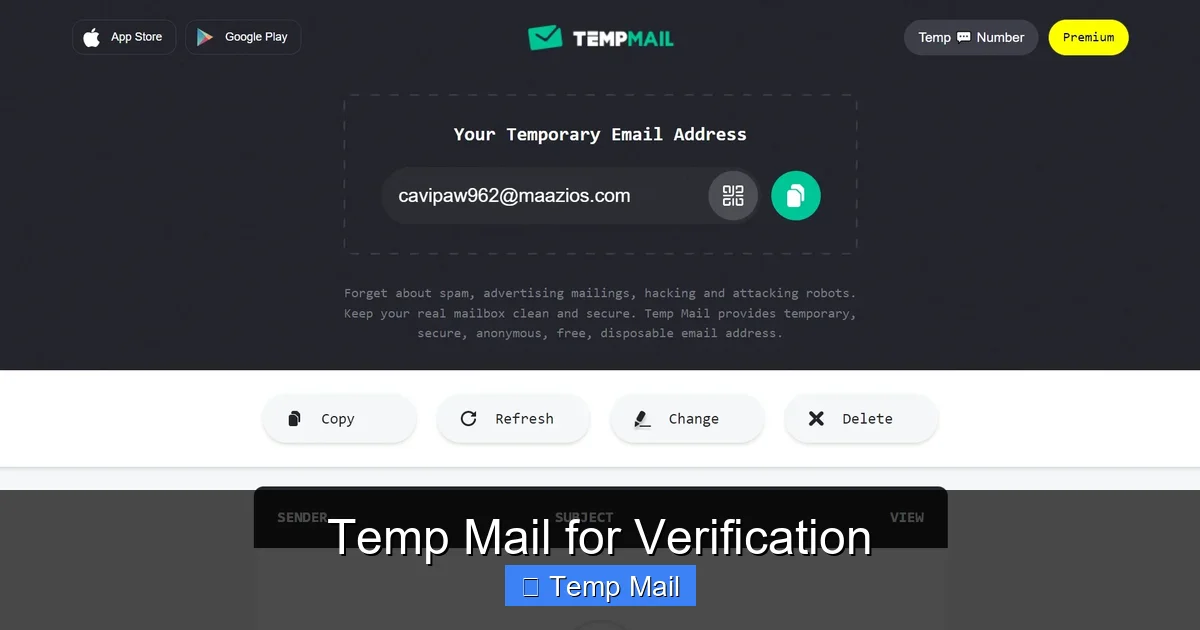
At its heart, a temp mail provider operates on the Disposable Email Address (DEA) model. You visit their website, and they instantly generate an address like randomstring123@tempmail.service. That address is now active. You copy it, paste it into the website demanding verification, switch back to the temp mail tab, and hit refresh. Within seconds, the verification email appears in your temporary inbox. You click the link, complete the task, and then you simply close the tab. That address and all its emails are automatically deleted after a short period. No trace. No subscription. No password needed.
How It Differs From Regular Email
Unlike your Gmail, Outlook, or Yahoo account, a temp mail inbox is:
- Ephemeral: It has a short, predetermined lifespan.
- Anonymous: No sign-up, no personal details tied to it.
- Publicly Accessible: Anyone with the exact address can view the inbox (a major security consideration we’ll cover later).
- Feature-Light: No folders, no contacts, no rich formatting—just plain text for receiving and viewing.
This simplicity is by design. Its sole job is to receive one or two verification emails and then vanish.
The Mechanics: How Temp Mail Services Actually Work
Understanding the backend helps you trust (or properly distrust) the process. When you generate a temp mail address, you’re not creating a new email account on a server in the traditional sense. You’re being given access to a shared, catch-all inbox on a domain the service controls.

Visual guide about Temp Mail for Verification
Image source: imag.malavida.com
The Catch-All Inbox System
Imagine the temp mail service owns the domain tempmail.example. They set up their mail server to accept any email sent to anything@tempmail.example and funnel it all into one giant, unorganized database. When you visit their site and they show you the address abc123@tempmail.example, they are simply reserving that specific string for your current browsing session. They’re not creating a unique mailbox; they’re giving you a unique “key” to look at the section of the shared database where emails sent to abc123@ are stored. When your session expires or you close the tab, that “key” is revoked, and the data is purged.
The Lifecycle of a Temp Mail Address
- Generation: You load the temp mail website. The server creates a random string and pairs it with their domain, displaying your new address.
- Usage: You copy this address and provide it to a third-party website. That website sends a verification email to your temp address.
- Retrieval: You return to the temp mail site and click “Check Inbox” or “Refresh.” The site queries its database for any emails received at your specific random string and displays them.
- Expiration: After a set time (e.g., 1 hour, 24 hours) or when you close your browser session, the service automatically deletes the emails associated with that random string from its database. The address becomes invalid for future use.
It’s a brilliantly simple system for a specific, low-stakes job.
Primary Use Cases: When and Why to Use a Temp Mail
Now we get to the good part: the practical applications. Using temp mail for verification is ideal in specific scenarios where the cost of using your real email outweighs the benefits of the account you’re creating.
Visual guide about Temp Mail for Verification
Image source: cdn.dribbble.com
1. Bypassing Gated Content
This is the #1 use case. A blog, news site, or research portal wants your email in exchange for a PDF report, whitepaper, or article access. Do you really want that site’s marketing emails? Probably not. Use a temp address, get the download link, and be done with it. Your primary inbox remains pristine.
2. Signing Up for One-Time Services or Trials
Need to create an account on a tool you’ll test for 30 minutes? A forum you’ll browse once? A software trial that insists on registration? A temp email is perfect. You get the access you need without committing your main email to a service you may never use again.
3. Avoiding Spam from E-commerce Sites
You’re making a one-off purchase from an unfamiliar online store. They’ll undoubtedly add you to their promotional list. Use a temp address for the order confirmation and shipping updates (which you’ll need for a few days). Once the package arrives, the address expires, and their future sale emails go nowhere.
4. Testing and Development
Developers and QA testers use temp mail services constantly. They need to test user registration flows, email notification systems, and password reset functions without cluttering real inboxes or creating dozens of dummy accounts. It’s an industry-standard practice.
5. Protecting Your Identity on Low-Trust Platforms
If you’re joining a forum or comment section known for toxic behavior or data scraping, using a temp address adds a layer of anonymity. It prevents someone from easily correlating your activity on that site with your real identity via your primary email.
Practical Example: The Step-by-Step
Let’s walk through a common scenario: downloading a free ebook.
- You find an ebook titled “Ultimate Guide to Home Brewing.” The site says, “Enter your email to get the free PDF.”
- Open a new tab, go to a trusted temp mail site like Temp-Mail.org or 10MinuteMail.com.
- Your temporary address is automatically generated: k7d8f9@tmpmail.org. Click the “Copy” button.
- Go back to the ebook site, paste k7d8f9@tmpmail.org into the form, and submit.
- Switch to the temp mail tab. You’ll see a new email arrive within 10-30 seconds. Open it, click the “Download PDF” link.
- The PDF downloads. You’re done. Close the temp mail tab. The address and the email with it will vanish in 10 minutes (or whatever the service’s timer shows). No follow-up from the brewing site in your main Gmail.
Simple, right? That’s the power of the tool.
The Critical Risks and Major Limitations You Must Know
Temp mail is fantastic for its intended purpose, but it is not a universal solution. Blindly using it for everything is a recipe for lost access, security breaches, and frustration. Understanding these limitations is non-negotiable.
Visual guide about Temp Mail for Verification
Image source: i.ytimg.com
1. The Public Inbox Problem (Biggest Security Risk)
This is the most important warning. Because temp mail inboxes are accessed via a simple, guessable URL (like tmpmail.org/inbox/abc123), anyone who knows or guesses your temporary address can view your inbox. There is no password. If you use a temp mail for any account that contains sensitive information—password resets, financial details, personal messages—you are leaving that data wide open to anyone on the same network or who stumbles upon the URL. Never, ever use temp mail for anything where the contents of the verification email are confidential.
2. No Account Recovery, Ever
You used a temp mail to sign up for a service. Six months later, you forget your password and click “Forgot Password.” The reset link is sent to expiredtempaddress@service.com. That inbox is gone forever. You are permanently locked out of that account. There is no “I lost my email” support ticket that will help you. The account is dead. This is why you must only use temp mail for accounts you are willing to abandon completely.
3. Blocked by Major Platforms
Smart companies know about temp mail services. Google, Facebook, Twitter, LinkedIn, major banks, and payment processors (PayPal, Stripe) actively block known disposable email domains from their sign-up forms. If you try to use @tempmail.org on these sites, you’ll get an immediate error: “Please enter a valid email address.” They do this for good reason—security and preventing fraud—so don’t be surprised when it happens.
4. Unreliable for Critical Communications
Some temp mail services have spotty deliverability. The verification email might land in the “spam” folder of the temp mail’s own system, or the sending service might reject the email because the temp domain has a poor reputation. You might never receive the email you need, leaving you stuck on the sign-up page. For critical tasks, this unreliability is unacceptable.
5. Legal and Terms of Service Violations
Using a temp mail to sign up for a service that explicitly requires a “real, personal email” in its Terms of Service is a violation. While unlikely to result in legal action for a free forum, it could get your account banned immediately if discovered. It also violates the spirit of many services that rely on email for essential communication.
How to Choose a Good Temp Mail Service
Not all temp mail providers are created equal. If you’re going to use one, pick a reputable one. Here’s what to look for:
- No Ads or Malicious Links: The site itself should be clean. Avoid services bombarded with misleading “Download” buttons or adult ads, as they are often breeding grounds for malware.
- Clear Expiration Timer: The site should visibly show you how much time is left on your inbox (e.g., “14:32 remaining”).
- Multiple Domain Options: Good services offer a choice of domains (e.g., @tmpmail.org, @tmpmail.net). If one domain gets blocked by a site you’re trying to access, you can try another.
- Manual Email Deletion: The ability to manually delete specific emails or the entire inbox before the timer runs out is a useful feature for privacy.
- HTTPS Encryption: The site must use HTTPS (the padlock in your browser). This encrypts the connection between you and their server, preventing eavesdropping on your session.
- Good Reputation & Longevity: Stick with well-known, established names in the space (e.g., Temp-Mail, 10MinuteMail, Guerrilla Mail). They are more likely to have stable servers and better deliverability.
Do a quick search for “best temp mail 2024” to see current community recommendations, as services can change in quality or disappear.
Best Practices and Ethical Usage Guidelines
To use temp mail for verification effectively and responsibly, follow these rules of thumb.
The Golden Rule: The “Willing to Lose” Test
Before you paste that temp address, ask yourself: “Am I completely willing to lose access to this account forever and ever?” If the answer is no, do not use a temp mail. This single question filters out 90% of bad use cases.
Use It For:
- Downloading gated content (ebooks, reports).
- Accessing a single article on a paywall site.
- Registering for a free webinar where you’ll get the recording link via email (you only need the link once).
- Testing a new app or service for 10 minutes.
- Signing up for a store’s discount coupon, knowing you’ll get spam.
Never Use It For:
- Any financial account (banking, investing, crypto).
- Primary social media profiles (Facebook, Instagram, Twitter/X).
- Your main email provider (Gmail, Outlook, ProtonMail).
- Work or school-related accounts.
- Any service where password resets or important notifications are sent via email.
- Accounts where you might need customer support.
- Anything requiring two-factor authentication (2FA) via email.
Pro-Tip: The ” burner Email” Alternative
For slightly more commitment, consider creating a dedicated “burner” email address with a free provider like Gmail or Outlook. Use this address only for signing up to newsletters and low-value sites. It’s not disposable, but it’s segregated from your primary inbox. You can periodically clean it out and, if it gets too spammy, abandon it. This sits between your main email and a fully temporary one, offering a balance of accessibility and compartmentalization.
The Future: Privacy Trends and the Role of Temp Mail
The demand for temp mail for verification is a direct symptom of a broken internet economy where personal data is the currency. As privacy regulations like GDPR and CCPA give users more rights, and as browser tracking prevention improves, companies are clinging ever tighter to the email address as a stable identifier. This tension means disposable email services will remain relevant.
We may see evolution: integration with password managers, browser extensions that auto-generate and auto-fill temp addresses, and more sophisticated blocking/evasion techniques between services and providers. Some forward-thinking services are starting to offer “private email forwarding” as a more robust alternative to pure disposability. However, the core need—a quick, no-strings way to satisfy an email gate—is timeless. Until websites stop demanding an email for every trivial interaction, the temp mail will be the user’s quiet rebellion, a small but significant act of digital self-defense.
Conclusion: A Tool for the Discerning User
Temp mail for verification is not a magic bullet for all your privacy woes, but it is an exceptionally effective and simple tool for a very specific set of problems. It’s the digital equivalent of using a fake name at a coffee shop to avoid getting on a mailing list. Used wisely, it protects your primary inbox from spam, reduces your digital footprint, and streamlines access to gated content. The key is discernment. You must understand its severe limitations—the public inbox, the lack of recovery, the platform blocks—and respect them. By applying the “willing to lose” test and sticking to low-stakes sign-ups, you can harness the power of the disposable inbox without falling into its traps. In the constant battle for your personal data, a temp mail service is a small, free, and potent weapon in your privacy arsenal. Use it intelligently.
Frequently Asked Questions
Is using temp mail for verification legal?
Yes, using a temp mail service is legal in most jurisdictions. However, it may violate the Terms of Service of the website you’re signing up for, which could result in your account being banned. It should never be used for fraudulent or illegal activities.
Can temp mail be traced back to me?
Generally, no. Reputable temp mail services do not require any personal information and do not log your IP address in a way linked to the disposable address. However, the website you use the temp address on will have your IP address and can see you used a disposable domain. The temp mail provider itself could, in theory, be compelled to hand over server logs if involved in a serious investigation, but for everyday use, you remain anonymous.
Why did my verification email not arrive in the temp inbox?
>This is common. Possible reasons include: the sending website blocked the temp mail domain, the email landed in the temp service’s “spam” folder (check there), the temp mail service had a temporary outage, or the email took longer than the inbox’s lifespan to arrive. Try refreshing, using a different temp domain, or a different temp mail service.
Is it safe to use temp mail for online shopping?
It is risky. Order confirmations, shipping notifications, and especially password reset links for the store’s account would be sent to the disposable address. You would lose access to order tracking and your account after the inbox expires. Use it only for a one-time purchase from a site you trust, and save the order confirmation page as a PDF.
Do temp mail services store my data?
Legitimate services state they do not log or store emails after the inbox expires. However, you are trusting a third party with any content of the emails you receive. Never use temp mail for sensitive personal data, passwords, or confidential information, as the inbox content could potentially be accessed by the service provider or hackers.
What’s the difference between a temp mail and a burner email?
A temp mail is fully disposable, anonymous, requires no sign-up, and expires in minutes/hours. A burner email is a separate, real email account (like a new Gmail) that you create and control. It requires setup, a password, and recovery options. It’s more permanent but can be abandoned later. A burner email offers more reliability for account recovery than a temp mail but requires more initial effort.