Email Without Registration
Email without registration, often called disposable or temporary email, provides a private, no-signup email address for short-term use. It’s the perfect tool for avoiding spam, protecting your identity, and bypassing mandatory email fields on websites you don’t fully trust. These addresses are created instantly and automatically expire, keeping your primary inbox clean and secure.
You’re about to download a useful e-book. You click the “Download” button, and a form pops up. “First Name, Last Name, Email Address.” You sigh. You know that giving out your real, primary email address is like handing a stranger a key to your digital front door. It will likely be sold to marketers, added to spam lists, and potentially caught in a future data breach. What if you could just… not? What if you could get that download link without leaving a trace? This is the simple, powerful promise of email without registration.
Welcome to the world of disposable email—a tool that’s both incredibly simple and profoundly useful for navigating our data-hungry internet. It’s not about hiding illicit activity; it’s about pragmatic privacy. In a landscape where every click is tracked and every form is a data collection point, having a throwaway email address is like wearing a digital mask for the mundane tasks of everyday browsing. This guide will walk you through everything you need to know: what it is, how it works, why you should use it, where it might fall short, and how to choose the best service for your needs.
Key Takeaways
- Core Concept: Email without registration creates a temporary, anonymous inbox without any personal details or account creation.
- Primary Benefit: Its main job is to shield your permanent email address from spam, data breaches, and unwanted marketing.
- Enhanced Privacy: It prevents websites from linking your online activity to your real identity or primary email.
- Limited Use Case: These addresses are for receiving verification emails only and are not meant for sending personal or important communications.
- Automatic Cleanup: Inboxes self-destruct after a set time (usually 10 minutes to 24 hours) or after a single use, ensuring no long-term data residue.
- No Cost, No Strings: The service is typically free and requires zero personal information, aligning with its privacy-first promise.
- Not for Everything: Never use disposable email for critical accounts like banking, primary social media, or any service requiring long-term access and password recovery.
📑 Table of Contents
- What Exactly is “Email Without Registration”?
- How Do Disposable Email Services Work? The Technology Behind the Simplicity
- Key Benefits and Practical Use Cases: Why You Need This Tool
- Security and Privacy Considerations: The Other Side of the Coin
- Potential Drawbacks and How to Mitigate Them
- How to Choose the Right Disposable Email Service
- Conclusion: Your Digital Bouncer
What Exactly is “Email Without Registration”?
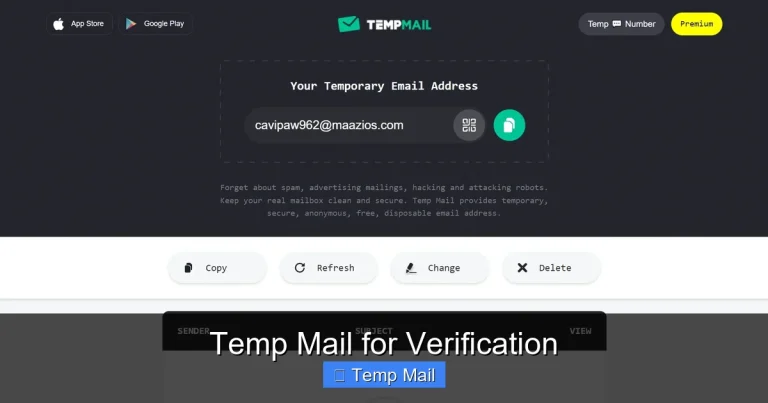
At its core, email without registration is a service that provides you with a functioning email address—complete with an inbox—in a matter of seconds, without asking for your name, phone number, or any other personal information. There is no “Sign Up” button. There is no password to create or remember. You simply visit a website, and it generates a random email address for you, like xyz12345@tempmail.example. You use that address wherever you need a temporary inbox, check the received messages on the service’s website, and then… you forget about it.
The Disposable Difference
This is different from creating a free email account with Gmail or Outlook. Those services require registration, tie the account to your IP and device history, and are designed for permanent, long-term use. A disposable email service operates on a completely different philosophy: anonymity, temporariness, and zero commitment. The entire system is designed to be a one-time-use tool, much like a physical paper shredder for your digital correspondence.
Common Names and Terminology
You’ll hear several terms used interchangeably:
- Disposable Email: Emphasizes the “use once and throw away” nature.
- Temporary Email: Highlights the short lifespan of the address.
- Throwaway Email: A colloquial term for the same concept.
- Incognito Email: Focuses on the privacy and anonymity aspect.
- Temp Mail: A popular brand name that has become shorthand for the category.
All of these point to the same fundamental service: email without registration.
How Do Disposable Email Services Work? The Technology Behind the Simplicity
The magic of email without registration is in its elegant, automated simplicity. There’s no human operator manually handing you an email. It’s a fully automated system built on standard email protocols with a temporary twist.
Visual guide about Email Without Registration
Image source: itigic.com
The Instant Generation Process
1. Visit the Service Website: You go to a site like Temp-Mail.org or 10MinuteMail.com.
2. Automatic Address Creation: The server instantly generates a random email address. The “inbox” for this address is created on the spot in the server’s database.
3. Copy and Use: You copy that address and paste it into the website you’re visiting.
4. Email Routing: When that website sends a confirmation or download link, it sends it to the disposable service’s mail server. The server recognizes the address, places the email in the corresponding temporary inbox, and flags it as “unread.”
5. You Check the Inbox: You refresh the disposable service’s webpage, and the email appears in your temporary inbox. You click any links or copy codes.
6. Auto-Deletion: After a predetermined time (e.g., 10 minutes, 1 hour, 1 day) or after the inbox is manually cleared/closed, the server permanently deletes the email address and all its contents from the database.
No Storage, No History
The key technological feature is the lack of persistent storage. Unlike Gmail, which keeps your emails indefinitely (unless you delete them), disposable email services are configured to purge data aggressively. This is their privacy guarantee: we do not keep your emails, and we cannot retrieve them once gone. The service provider has no way to link that temporary address back to you because you never provided any identifying information to begin with.
Key Benefits and Practical Use Cases: Why You Need This Tool
Knowing the theory is one thing; understanding the real-world applications is what makes this tool indispensable. Here are the most common and powerful use cases for email without registration.
Visual guide about Email Without Registration
Image source: awaxtech.com
1. Dodging Spam and Marketing Overload
This is the #1 reason people use disposable email. Every time you sign up for a newsletter, a discount coupon, a free webinar, or a forum, you are giving your email to an entity that will likely share or sell it. Your primary inbox becomes a firehose of promotional emails. By using a temporary address for these low-stakes signups, you create a spam buffer zone. The spam goes to the disposable inbox, which self-destructs, leaving your main inbox pristine.
Practical Tip: Have a favorite disposable service bookmarked. Use it for every non-essential signup. If you later decide you *do* want to receive that newsletter, you can always sign up with your real email.
2. Bypassing “Email Wall” Gated Content
How many times have you wanted to read a blog post, industry report, or software trial, only to be stopped by a form demanding your email? Often, the content isn’t worth the ensuing spam. A disposable email lets you get the content instantly without the commitment. You get the PDF, the whitepaper, or the access code, and the temporary address handles the follow-up emails (which you’ll never see).
3. Protecting Your Identity on Untrusted Platforms
Are you trying out a new, obscure social media app? Signing up for a sketchy online contest? Creating an account on a forum with questionable moderation? Using your primary email ties your real identity to that platform. A disposable email allows you to explore and test services anonymously. If the platform turns out to be malicious or a data-harvesting operation, your identity and primary inbox remain safe.
4. Securing Accounts on Less Important Services
Do you need an account for a one-time project on a freelance site you might not use again? For a gaming platform you’re trying out? For a comment section on a news site? These are perfect candidates for a temporary email. It isolates the risk. If that specific service suffers a breach, your email and password from that site are compromised, but hackers have no link to your other, more important accounts.
5. Avoiding Email Tracking and Profiling
Some advanced marketers use “spy pixels” or tracking links in emails to see if you opened them, where you were, and what device you used. These trackers are often tied to your specific email address. Since a disposable inbox is cleared quickly, it limits the window for tracking. Furthermore, because the address is random and not tied to you, any profile built from its activity is anonymous and useless for targeted advertising against your real self.
6. Testing Email Functionality for Developers
If you’re a developer or QA tester, you often need to test email verification flows, password resets, and notification systems. Creating dozens of real email accounts is a hassle. Disposable email services provide a rapid testing environment. You can generate a new address for each test case, trigger the email, and verify its contents without cluttering real inboxes.
Security and Privacy Considerations: The Other Side of the Coin
While email without registration is a powerful privacy tool, it’s crucial to understand its security model and limitations. Using it incorrectly can create new risks.
Visual guide about Email Without Registration
Image source: clean.email
The Illusion of “Secret” Communication
A critical fact: **The content of the emails you receive in a disposable inbox is NOT private from the service provider.** The service’s server receives and stores the email temporarily before you see it. While reputable services do not actively read or log content, the technical reality is that they have access to it. Therefore, never use a disposable email for sensitive information—private documents, financial details, confidential business plans, or password recovery for important accounts. Assume anything sent to a temp address could be seen by the service’s administrators.
Inbox Security and Public Access
Most disposable services work by having a publicly accessible inbox page. The only “security” is the randomness of the email address (e.g., a8f3e@service.com). If someone else guesses or stumbles upon that exact URL, they can see the same emails you can. This is why these services are for receiving verification codes, not for private correspondence. The moment you receive an email with a personal or sensitive link, you should consider that inbox compromised.
No Sending Capability (Usually)
With very few exceptions, disposable email services are receive-only. You cannot use them to send emails to others. This is a deliberate design choice to prevent abuse (spamming from the service) and to reinforce the tool’s purpose as a one-way receptor for verification messages. If you need to send an email anonymously, you would need a different tool, like an encrypted email service or a VPN with a new account.
Legal and Service Compliance
Using a temporary email to sign up for a service that explicitly requires a “real, valid, and monitored” email address in its Terms of Service may violate those terms. While unlikely to result in legal action for a free forum, it could lead to the immediate suspension of that account. Some services actively block known disposable email domains. Use your judgment: for a free trial, it’s fine; for a paid subscription where you need ongoing access, use your real email.
Potential Drawbacks and How to Mitigate Them
No tool is perfect. Understanding the limitations of email without registration helps you use it effectively and avoid pitfalls.
1. The Ephemeral Nature: You Might Lose Access
The biggest drawback is that the inbox disappears. If you need to access that verification email again 24 hours later, you can’t. The service is gone. Mitigation: Only use it for tasks you can complete in one sitting. If the website promises to send a receipt or long-term resource via email, use your primary address. For a one-time login code or download link, disposable is perfect.
2. Blocked by Some Websites
Many websites maintain lists of disposable email domains and will block you from signing up with them. This is becoming more common as services fight spam and fraud. Mitigation: If your preferred temp mail domain is blocked, try a different service provider. There are hundreds. However, if a site is *very* strict, you may have no choice but to use your real email or abandon the sign-up.
3. No Account Recovery, Obviously
If you use a disposable email to sign up for a service and then forget your password, you are permanently locked out. There is no “Forgot Password” email to receive. Mitigation: This is non-negotiable. Never, ever use disposable email for any account where you might need to recover access, change settings, or receive important notifications in the future. This includes social media, online banking, cloud storage, primary work accounts, and subscription services you pay for.
4. Potential for Abuse and Reputation Damage
Because they are anonymous, disposable emails are sometimes used for malicious purposes: sending spam, creating fake accounts for abuse, or bypassing bans. This can lead to the entire domain (e.g., @tempmail.com) being blacklisted by major email providers like Gmail or Outlook. If a legitimate service you use later sends an email to your disposable address, it might get rejected or sent to spam because the domain has a poor reputation. Mitigation: Use well-known, reputable disposable services that actively work to prevent abuse and maintain good sending reputations. Avoid obscure, fly-by-night sites.
How to Choose the Right Disposable Email Service
Not all email without registration services are created equal. When selecting one, consider these factors:
Inbox Lifespan Options
Look for a service that offers flexibility. Do you need just 10 minutes? An hour? A full 24 hours? Some services let you extend the time manually. Choose based on your typical task. For a quick download link, 10 minutes is fine. For a multi-step registration that might take 20 minutes, look for at least a 1-hour lifespan.
Domain Variety and Customization
Some services offer multiple domain options (e.g., @tmpmail.org, @dispostable.com). This is useful if one domain gets blocked by a website you’re trying to access. A few premium services even let you customize the local part (the part before the @) for easier remembering, though this is rare in free tiers.
User Interface and Features
The best services have a clean, simple interface. Look for: a clearly displayed inbox, a prominent “Refresh” button, the ability to reply (rare, but some offer it), and clear indicators of time remaining. Some offer browser extensions or mobile apps for quicker access. Avoid services cluttered with aggressive ads or pop-ups.
Privacy Policy and Reputation
Read the privacy policy. Does it state they do not log IP addresses? Do they claim to never read or store your emails? A transparent policy is a good sign. Stick to well-known, established services like Temp-Mail, 10MinuteMail, or Guerrilla Mail. These have been around for years and have built a reputation for relative reliability.
Ad-Supported vs. Premium
The vast majority are free and ad-supported. Expect to see ads on the page. This is how they make money. Some offer “premium” plans with ad-free interfaces, longer lifespans, and custom domains. For most casual users, the free version is perfectly adequate. Only consider a paid plan if you are a developer testing at scale or need very specific, long-lasting temporary addresses.
Conclusion: Your Digital Bouncer
Email without registration is not a magic bullet for all your privacy needs, but it is one of the simplest, most effective tools in your digital hygiene kit. Think of it as a bouncer for your primary inbox. It stands at the door of every questionable website, takes the spam flyers and unwanted attention, and then quietly disappears without a trace. It empowers you to say “no” to data collection for the small, everyday interactions that shouldn’t require a lifelong commitment.
The responsible use of disposable email is a sign of a savvy internet user. It acknowledges that the default setting of the web is to collect, not to protect. By consciously choosing when to use a temporary address and when your real email is necessary, you reclaim a small but significant piece of control. So, the next time you see that email field on a form you’re hesitant about, remember: you don’t have to hand over the keys. You can simply generate a key that works once and then vanishes. That’s the quiet power of email without registration.
Frequently Asked Questions
Is using disposable email legal?
Yes, using a temporary email service is completely legal. It is a standard tool for privacy protection. However, using it to commit fraud, evade bans, or send illegal content is, of course, illegal regardless of the email type used.
Can I send emails from a disposable address?
Almost never. Disposable email services are designed almost exclusively for receiving verification or notification emails. They typically lack SMTP servers for sending. Their purpose is to be a receptor, not a sender, to prevent abuse of the service for spamming.
How long do disposable email addresses last?
It varies by service. Common lifespans are 10 minutes, 1 hour, 1 day, or until the browser tab/window is closed. Some services allow you to manually extend the time. Always check the countdown timer on your specific service’s page.
Are disposable emails safe for signing up on important websites?
No. You should never use them for critical accounts like online banking, primary email providers, main social media profiles, or any service where you need password recovery, important notifications, or long-term access. Use them only for low-stakes, non-essential signups.
Do disposable email services store my IP address or activity?
It depends on the service’s privacy policy. Reputable services claim not to log IP addresses or link activity to a user. However, because you access the service’s website, your IP is visible to them during that session. For maximum anonymity, use the disposable service through a VPN or Tor browser.
Are all disposable email services free?
Yes, the vast majority are free and supported by advertising. Some offer optional premium plans with extra features like ad-free interfaces, longer expiration times, or custom domains, but the core function of receiving an email without registration is almost always free.