Private Temporary Email
Private temporary email is your digital shield against spam, data harvesting, and inbox clutter. It provides a quick, disposable email address for any online interaction where you’d rather not use your primary email. These services are free, require no registration, and automatically delete messages after a short time, ensuring your personal information stays private and your main inbox remains clean.
Key Takeaways
- Privacy First: It separates your real identity from online activities, preventing companies from linking your actions to your primary email.
- Spam Combatant: By using a disposable address for sign-ups and downloads, you keep promotional and malicious emails out of your permanent inbox.
- No Strings Attached: Most services require no sign-up, password, or personal details to create an address.
- Ephemeral by Design: Inboxes and their contents are automatically deleted after a set period (usually 10 minutes to 24 hours).
- Versatile Utility: Perfect for account verification, downloading gated content, forum access, and testing online forms.
- Not for Critical Communication: Never use it for banking, important subscriptions, or any service requiring long-term account recovery.
- Provider Variability: Features, lifespan, and security differ between services; choose based on your specific need (duration, domain choice, etc.).
📑 Table of Contents
- What Exactly is a Private Temporary Email?
- How Does a Private Temporary Email Service Work? (The Simple Mechanics)
- The Powerful Benefits: Why You Should Use One
- Top Real-World Use Cases: When to Reach for a Temp Mail
- Choosing the Right Provider: What to Look For
- Important Limitations and Crucial Best Practices
- The Future and Final Verdict: A Necessary Tool for the Modern Web
What Exactly is a Private Temporary Email?
Imagine you’re at a crowded party and someone asks for your home address. You’d probably hesitate, right? That’s the feeling many of us have when a random website asks for our email address. We know it’s often the first step to a lifetime of promotional emails, data profiling, and potential data breaches. This is where the brilliant concept of a private temporary email comes into play.
At its core, a private temporary email is a service that provides you with a random, disposable email address for a very short period. Think of it as a burner phone for your digital correspondence. You use it once or twice for a specific, low-stakes purpose, and then it vanishes into the digital ether, along with any messages it received. The “private” part is key: reputable services don’t require you to create an account, set a password, or provide any personal information to generate an address. The entire process is designed to be anonymous and fleeting.
The Core Philosophy: Ephemeral Communication
The philosophy behind temporary email is simple: not every online interaction deserves a permanent record attached to your identity. When you click “Download Now” on an ebook that requires an email, or when you need to verify a phone number for a one-time app trial, you’re engaging in a transaction where long-term communication is not the goal. You’re trading your email address for immediate access. A private temporary email allows you to make that trade without devaluing your primary, personal email address.
How Does a Private Temporary Email Service Work? (The Simple Mechanics)
The magic of these services lies in their elegant simplicity. There’s no complex software to install. Here’s the typical, three-step lifecycle of using a private temporary email:
Visual guide about Private Temporary Email
Image source: res.cloudinary.com
Step 1: Generation – Instant and Anonymous
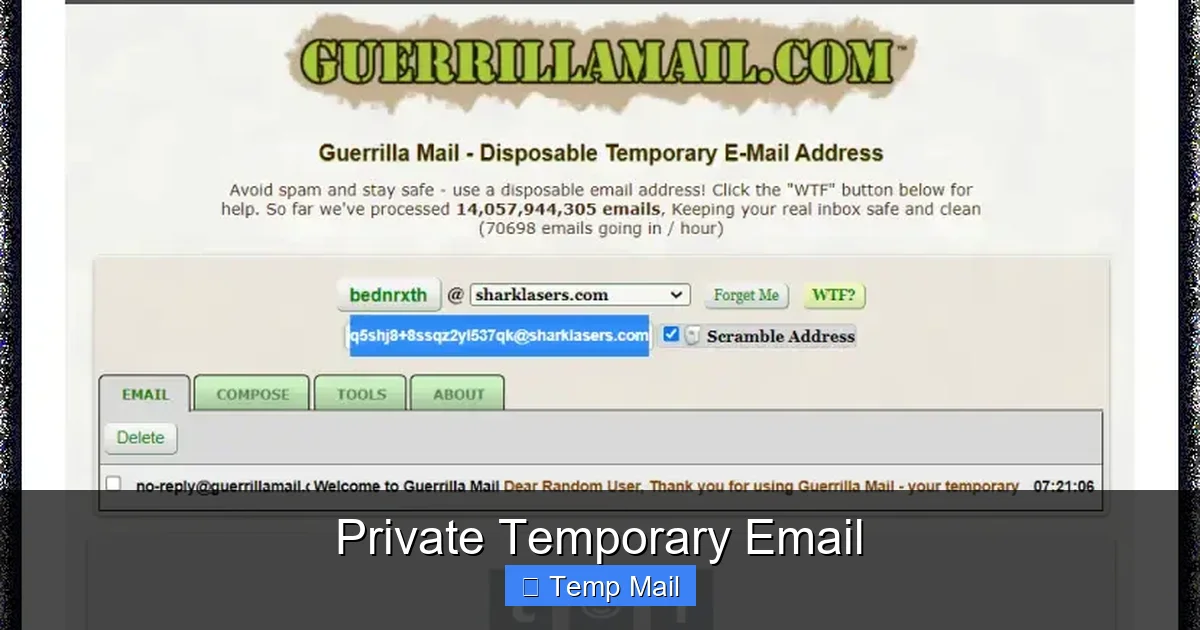
You visit a provider’s website, like Temp-Mail.org, 10MinuteMail.com, or Guerrilla Mail. Upon loading the page, the system automatically generates a random email address for you. It usually looks something like “x7k9p2@domain.com.” This address is tied to a temporary inbox that exists on the provider’s servers. Crucially, you didn’t log in. You didn’t choose a password. The address and its associated inbox are now linked to a unique session identifier, often stored in your browser’s temporary memory (cookies or session storage).
Step 2: Usage – The Disposable Inbox
Copy that randomly generated address and paste it into any website that requests an email. Want to sign up for a forum to read a single thread? Use it. Need an email to get a discount coupon? Use it. The website will send a verification link or a download link to your temporary inbox. To retrieve it, you simply stay on the provider’s website (or return to it) and watch the inbox fill up in real-time. Most services refresh the inbox automatically every few seconds. You click the link or download the file, completing your task.
Step 3: Expiration – The Great Cleanup
This is the most important step. After a predetermined time—which can range from 10 minutes to 24 hours depending on the provider—the entire system cleans house. The email address is retired. The inbox and all its contents are permanently deleted from the servers. The session identifier becomes invalid. If you try to revisit that specific inbox later, it will be empty or show an error. Your digital footprint for that transaction is completely erased.
The Powerful Benefits: Why You Should Use One
Using a private temporary email isn’t just a trick for the privacy-paranoid; it’s a practical tool for every modern internet user. The benefits stack up quickly.
Visual guide about Private Temporary Email
Image source: online-smss.com
1. Unmatched Spam Prevention
This is the number one reason people adopt disposable email. Every time you use your primary email for a trial, a download, or a one-off registration, you’re handing that company permission to email you. Even if you unsubscribe later, your email is often sold to other marketing lists. A temporary address acts as a sacrificial lamb. Any spam sent to it simply disappears when the inbox expires, leaving your real inbox pristine.
2. Enhanced Privacy and Anonymity
Your email address is a powerful key to your digital identity. It can be used to look up your social media profiles, find other accounts you own (via data breaches), and build a profile of your interests. By using a different, anonymous address for each minor website, you prevent these entities from creating a cohesive picture of “you.” This is especially valuable when accessing content in regions with censorship or when researching sensitive topics.
3. Zero Commitment and Zero Risk
There’s no “account creation” anxiety. No password to forget. No security questions to set up. You click a button, get an address, use it, and forget it. If a website turns out to be a phishing scam or a malware distributor, the only thing they got was a throwaway email that leads to a dead end. Your real credentials and primary inbox are completely safe.
4. Bypassing Gated Content with Ease
How many times have you wanted to read an article, access a research paper, or get a template, only to be stopped by an email gate? A private temporary email lets you politely decline the long-term relationship and get the content you need immediately. It’s a fair transaction: you give a valid (but temporary) email, they give you the file. No guilt, no follow-up.
5. Simplified Testing for Developers and Marketers
For professionals, these tools are indispensable. A developer testing a website’s registration flow can use dozens of temporary addresses to automate testing. A marketer can test how a lead magnet email lands in different types of inboxes (some providers offer different domain options). It’s a low-cost, high-efficiency testing environment.
Top Real-World Use Cases: When to Reach for a Temp Mail
Knowing the theory is good, but seeing the practical applications is even better. Here are the most common and effective scenarios for deploying a private temporary email.
For the Casual Browser: Avoiding Newsletter Overload
You see an amazing sale on a store you rarely shop at. You want the 20% off code. Instead of signing up with your main Gmail, use a temp mail. Get the code, make your purchase, and let the inbox expire. The store’s subsequent “We miss you!” emails will vanish into the void.
For the Content Seeker: Downloading Gated Assets
You’re writing a blog post and need a specific industry report. A company offers it in exchange for your email. Use your disposable address. Download the PDF. The “thank you” email and the 10 subsequent nurture emails will all go to an inbox that dies in an hour. Your primary inbox, used for real client communication, is untouched.
For the Online Shopper: One-Time Trials and Sign-Ups
Want to try a premium graphic design tool for 14 days? A streaming service for a specific show? Use the temp mail for the initial sign-up and verification. Set a calendar reminder to cancel the trial before the payment date (using your real, primary email for the cancellation confirmation, if needed). The trial service will have no way to market to you after your temp inbox dies.
For the Social Media User: Creating Alternate Accounts
Some platforms have policies against multiple accounts, but for legitimate reasons (separating personal and professional, managing a brand page), you might need one. Using a private temporary email for the initial creation can help compartmentalize these identities. (Note: For platforms like Facebook or Google, long-term use of a temp mail is not feasible as they require ongoing access for security).
For the Security-Conscious: Protecting Against Data Breaches
When you hear about a major data breach at a company you once used a temp mail with, you can breathe easy. That compromised email address is already dead. The attackers have a key to a door that no longer exists. Your primary email and its linked accounts (bank, social media, etc.) remain insulated.
Choosing the Right Provider: What to Look For
Not all private temporary email services are created equal. While the core function is similar, nuances exist that can make one provider a much better fit for your needs than another.
Key Feature Checklist
- Inbox Lifespan: How long does the inbox stay active? 10 minutes? 1 hour? 24 hours? For quick downloads, 10-15 minutes is fine. For a forum registration that might require you to check back later, look for a 1-hour or 24-hour option.
- Domain Variety: Some services offer multiple domain options (e.g., @tempmail.com, @tmpmail.org, @dispostable.com). Using different domains can help if a specific site blocks known temp mail domains.
- Attachment Support: Can you receive emails with attachments (PDFs, images, ZIP files)? Most can, but it’s worth confirming if you’re using it for downloads.
- Manual Address Generation: Some sites let you choose or edit the local part of the email (the part before the @). This can be useful for remembering which address you used for which purpose.
- Browser Extension/App: For power users, some providers offer browser extensions or mobile apps that make generating and accessing temp mail even faster.
- No Captcha/Simple UI: The best services have a clean interface with no annoying CAPTCHAs or pop-up ads blocking the inbox view.
Popular Provider Examples
Temp-Mail.org: One of the most popular. Offers a 1-hour default lifespan, multiple domains, and a very clean, ad-light interface. Often the first recommendation.
10MinuteMail.com: The classic. Strictly 10 minutes, which is perfect for ultra-quick tasks. Very simple and no-frills.
Guerrilla Mail: Offers a surprising 24-hour inbox lifespan. You can even choose your own inbox name from a list. Good for tasks that might require a slightly longer window.
DropMail.me: Features a unique “create a new address” button that generates a fresh one instantly, and you can have multiple active addresses at once on the same page.
Mailinator (Public Inboxes): A different model. Its public inboxes (like “test@mailinator.com”) are accessible to anyone who guesses the name. This is less private but useful for testing where you don’t care about the content secrecy, just the delivery.
Important Limitations and Crucial Best Practices
A private temporary email is a powerful tool, but it’s not a magic bullet for all your email needs. Understanding its limitations and following best practices is essential for using it safely and effectively.
The Critical “Do Not Use” List
Never, under any circumstances, use a temporary email for:
- Financial Accounts: Banks, PayPal, stock trading apps, cryptocurrency wallets. These require secure, recoverable, and permanent communication channels.
- Primary Service Accounts: Your main Apple ID, Google Account, Microsoft Account, or Adobe ID. Account recovery is tied to your email. Lose the email, lose the account.
- Important Subscriptions: Utilities, insurance, official government correspondence (taxes, vehicle registration). Legal and billing documents must be accessible long-term.
- Any Service You Might Need to Recover: If you forget your password, the reset link goes to the email on file. A dead inbox means a locked account forever.
Best Practices for Safe and Smart Use
1. Use a Dedicated Browser or Incognito Window: To maximize privacy, open an incognito/private browsing window to generate your temporary address. This prevents the session from being tied to your regular browser profile and cookies.
2. Keep the Tab Open: Don’t close the tab with your active inbox until you’ve received the necessary verification email or download link. Some services may invalidate the session if you navigate away for too long.
3. Act Quickly on Time-Sensitive Matters: Be aware of the inbox’s countdown timer. If you’re waiting for a verification code, don’t start the process if you only have 2 minutes left on a 10-minute mail service.
4. Don’t Expect a Reply: You cannot send emails from a private temporary email address (with very few exceptions). Its sole purpose is to receive. If a website’s flow requires you to *reply* to an email to complete a process, a temp mail won’t work.
5. Assume Zero Security for Content: While the service provider isn’t actively mining your data (they delete it quickly), the communication between you and the provider’s server is often unencrypted (HTTP, not HTTPS). Never receive sensitive personal data (like a scanned passport or credit card statement) to a temp mail. Use it only for the low-stakes content it’s designed for.
The Future and Final Verdict: A Necessary Tool for the Modern Web
The digital world is increasingly demanding our email addresses as a toll for entry. This has turned our inboxes into crowded marketplaces and our personal data into a commodity. The private temporary email has emerged not as a黑客 tool, but as a legitimate and necessary instrument of digital self-defense. It rebalances the power dynamic, allowing us to engage with the web on our own terms—to sample, to test, to download—without leaving a permanent trail.
As data privacy regulations like GDPR and CCPA evolve, the principle of data minimization (collecting only what’s necessary) becomes more important. Using a disposable address for non-essential interactions is the purest form of data minimization you can practice. It tells companies, “I will participate in this transaction, but I do not grant you a perpetual channel to my attention or my identity.”
The technology itself is likely to evolve. We may see tighter integration with password managers, browser-native implementations, or even services that create a new unique forwarding address for every site you visit, all managed from a single dashboard. The core need, however, will remain: the need for a simple, ephemeral shield against the relentless noise of the commercial internet.
In conclusion, a private temporary email is not for everything. But for the vast majority of trivial, one-off, or content-gated interactions that populate our daily browsing, it is the perfect solution. It’s a small act of digital hygiene that keeps your primary identity clean, your inbox manageable, and your personal data firmly in your own hands. Start using one today for your next download or sign-up, and experience the immediate relief of an inbox that doesn’t belong to you, and therefore doesn’t burden you.
Frequently Asked Questions
Is using a private temporary email safe and legal?
Yes, it is completely legal and generally safe for its intended purpose of receiving non-sensitive communications. The safety risk is minimal if you use it correctly—never for banking or critical accounts. The primary “risk” is that the inbox is public to anyone who has the URL, so you should never receive sensitive personal data (like passwords or ID scans) to it.
How long does a temporary email address last?
It varies by provider. Common lifespans are 10 minutes (10MinuteMail), 1 hour (Temp-Mail), or 24 hours (Guerrilla Mail). The countdown is always displayed on the provider’s page. Once the time expires, the address and all its emails are permanently deleted.
Can I send emails from a temporary address?
Almost never. These services are designed as one-way, receive-only inboxes. Their purpose is to allow you to *be contacted* for verification or download links, not to engage in correspondence. Some very rare services may offer limited sending, but it’s not a standard feature.
What happens if I need to recover an account I signed up with a temporary email?
You will not be able to. This is the most critical limitation. If you sign up for a service where you might need password resets or important notifications, you must use a permanent, accessible email address. Temporary emails are strictly for disposable, non-essential interactions.
Are temporary email providers themselves secure? Can they read my emails?
Reputable providers delete emails quickly and have no incentive to monitor your low-value traffic. However, the connection to their site is often unencrypted (HTTP), so the content could theoretically be intercepted on the network path. More importantly, anyone with the inbox URL can view the emails, so assume the content is not private. Never use it for sensitive information.
How do websites know to block temporary email domains?
Many popular temp mail domains are public knowledge. Websites maintain lists of these domains (like @mailinator.com, @10minutemail.com) and block them during registration to prevent spam, abuse, and fake accounts. This is why using a lesser-known provider or one with multiple domain options can sometimes bypass these blocks.