Temporary Email Instant Access
Temporary email instant access provides a disposable email address the moment you need it, with no sign-up required. It’s your first line of defense against spam, data harvesting, and inbox clutter when registering for websites, downloading content, or verifying accounts. By using a throwaway address, you keep your primary email private and your digital footprint minimal. This tool is essential for anyone looking to browse and sign up online with confidence and control.
Key Takeaways
- Instant Setup: A temporary email address is generated immediately upon visiting the service website, requiring zero personal information or account creation.
- Privacy Protection: It shields your primary email from spam, marketing lists, and potential data breaches by using a disposable layer for non-essential online interactions.
- Time-Saving Convenience: Skip lengthy registration forms and password creations; you get a working inbox in seconds to receive verification codes or download links.
- Versatile Use Cases: Ideal for software trials, forum sign-ups, downloading gated content, or any situation where you distrust the website’s email practices.
- Built-In Expiry: Emails and inboxes automatically delete after a set period (often 24-72 hours), ensuring no long-term digital residue is left behind.
- No Sending Capability: Most services are receive-only, preventing misuse for sending spam, which reinforces their role as a privacy tool, not a full email replacement.
- Choose Reputable Providers: Opt for services with clear privacy policies, HTTPS encryption, and no logs policy to ensure the temporary email instant access is genuinely secure.
📑 Table of Contents
Understanding Temporary Email Instant Access
Let’s talk about a simple tool that solves a big modern problem: inbox overload. You know the drill. You want to download a free PDF, read an article, or try a new app. The website asks for your email address. You hesitate. You know that giving out your main email is like handing out your home address to every passerby. Soon, your inbox is flooded with promotions, newsletters you never read, and worse, your email could end up in a data breach. This is where temporary email instant access comes in as a brilliant, low-friction solution.
At its core, a temporary email service gives you a random, disposable email address that lives for a short time—usually a few hours to a couple of days. The “instant access” part is the magic. You don’t need to create an account, verify a phone number, or set a password. You simply visit the provider’s website, and an email address is generated for you on the spot. You copy it, paste it into the website you’re visiting, and then you can check the temporary inbox right on the same tab to get your verification link or download file. It’s privacy, simplified.
The Evolution of Disposable Communication
The concept isn’t new. For years, developers and privacy-conscious users have used “mailinator-style” services for testing applications. But the shift to instant access made it mainstream. Early disposable email tools sometimes required API keys or had complicated setups. Modern services prioritize the user experience: one click, one address. This evolution mirrors our growing awareness of digital privacy. We’re no longer willing to trade our primary contact details for basic web access. We want control, and temporary email delivers that control immediately.
How Instant Access Works in Practice
The beauty of this system lies in its utter simplicity. There’s no mystery, no complex backend that you need to understand to use it effectively. Let’s walk through the typical, seamless flow of using a temporary email instant access service.
Visual guide about Temporary Email Instant Access
Image source: images.template.net
The Registration-Free Advantage
This is the cornerstone. Traditional email services, even free ones like Gmail or Outlook, require you to sign up. You provide a phone number, recovery email, and set up security questions. A temporary email provider flips this model. They don’t want your information; in fact, they don’t ask for it. Their business model isn’t built on your data but often on displaying non-intrusive ads on their site or offering premium plans. By eliminating registration, they remove the biggest barrier to entry and the largest source of personal data exposure. You are a user for a few minutes, not a product for a lifetime.
Email Generation in Seconds
You land on the service’s homepage. Instantly, you see a randomly generated email address like xyz123@tempmail.pro. That’s it. It’s already active. Behind the scenes, the server has created a unique mailbox linked to that address. There’s no waiting for a confirmation email because there’s no account to confirm. The address is live and ready to receive messages immediately. Some services allow you to manually change the alias (the part before the @) if you want something more memorable, but the default random string is perfectly functional and enhances privacy by being unpredictable.
Real-Time Inbox Monitoring
Once you use that disposable address elsewhere, you simply refresh the temporary email service’s page. Any incoming emails will appear in a list, much like your regular inbox. You click on one to read its content. If it contains a verification link or a download button, you interact with it right there. Once you’ve retrieved what you needed, you can close the tab. There’s no “sign out” because there was no session to begin with. The entire process, from generating the address to getting your code, can take under 30 seconds. This is the epitome of temporary email instant access—a frictionless, ephemeral communication channel.
Key Benefits of Using Disposable Emails
Why go through this extra step? Because the benefits directly combat the annoyances and risks of using your primary email for everything. Let’s break down the core advantages.
Visual guide about Temporary Email Instant Access
Image source: selzy.com
Slay the Spam Dragon
This is the most obvious and gratifying benefit. Every time you use your real email on a sketchy or low-trust website, you’re effectively signing up for future spam. That site might sell your email to marketing partners. It could suffer a breach, leaking your address to spammers worldwide. A temporary email acts as a sacrificial lamb. Any spam sent to that disposable address simply vanishes when the inbox expires. Your primary inbox remains pristine, a sanctuary for emails from family, friends, and trusted colleagues. You regain control over what lands in your digital home.
Minimize Your Digital Footprint
Every online account you create is a data point that ties back to your identity. Data brokers and people-search sites aggregate these connections. By using a throwaway email for non-essential sign-ups, you sever that link. You prevent another database from associating your name, your preferences, and your browsing habits with your core identity. In an era of increasing data privacy regulations and personal data as a commodity, minimizing these associations is a powerful, proactive step toward digital anonymity for casual web use.
Breeze Through Registrations & Downloads
Friction is the enemy of conversion. Whether you’re a user trying to get a whitepaper or a developer testing a sign-up flow, temporary email instant access removes a major hurdle. No need to stop what you’re doing to open your email app, find a password, and type it in. You generate an address, paste it, and move on. For businesses offering gated content, this might seem counterintuitive, but for the end-user, it’s a massive time-saver. It respects your time and your attention, allowing you to get what you need without committing to a long-term relationship with a brand you’re just casually exploring.
Safe Exploration of New Services
Want to try a new social media platform, a SaaS tool, or a gaming site but feel uneasy about its privacy policy? Use a temporary email. You can create an account, explore the interface, and see if it’s worth your trust—all without risking your primary contact details. If the service turns out to be spammy, buggy, or untrustworthy, you simply abandon the disposable address. There’s no “account deletion” process to worry about because the account’s lifeline to you is cut off automatically. It’s a risk-free trial for your peace of mind.
Common Use Cases for Temporary Email
The theory is great, but seeing how people actually use this tool makes its value concrete. Here are the most frequent and practical scenarios where temporary email instant access shines.
Visual guide about Temporary Email Instant Access
Image source: bztech.com.br
Downloading Gated Content
This is the #1 use case. You find a valuable ebook, research report, or template that requires an email address to download. You suspect you’ll get added to a newsletter you don’t want. Use a disposable email. You get the download link instantly in the temporary inbox, and you never hear from the company again (unless you give them your real email later). It’s the perfect one-time transaction.
Signing Up for Free Trials & Software
Many software trials, especially for B2B tools, require an email to send the login details. Using your work or personal email means you’ll likely get a dozen follow-up sales emails. A temporary email lets you activate the trial, test the features, and decide if it’s worth buying—all without the vendor having a direct line to your main inbox. You control when and if you engage further.
Accessing Wi-Fi or Public Networks
Some airports, hotels, or cafes require you to register an email to get a Wi-Fi password or voucher. This is a classic data-harvesting tactic. Using a temporary email gets you online instantly without handing over your contact info to the venue’s marketing partners. It’s a small act of resistance against ubiquitous data collection in public spaces.
Forum or Comment Section Registration
You want to post a comment on a news article or join a discussion on a niche forum. These platforms often have poor moderation and can be spam magnets. Registering with your real email exposes you to potential hacking attempts (if the forum is compromised) and definitely to spam. A disposable email keeps your participation anonymous and your primary inbox safe from the forum’s own promotional emails.
Bypassing “Email Already Used” Errors
Ever tried to sign up for a service with your email only to get an error that it’s “already in use”? This usually means you signed up years ago and forgot. Instead of going through a password reset you don’t care about, just use a temporary email to create a fresh, clean account. It’s a quick fix for a frustrating error.
Security and Privacy Considerations
While incredibly useful, it’s vital to understand the security model of temporary email. It’s a tool with a specific purpose, and using it outside that purpose can be risky.
What “Secure” Means Here
Reputable temporary email services use HTTPS (SSL/TLS encryption) to secure the connection between your browser and their server. This prevents eavesdroppers on your network from seeing the emails you receive. However, the emails themselves are stored unencrypted on the provider’s servers. The “security” primarily means the provider does not require any personal information to link the inbox to you. Your anonymity comes from the lack of a user account, not from military-grade encryption of the message content. You should never send sensitive information like passwords, financial data, or confidential documents through a disposable address.
The “Anyone Can See” Inbox
This is the most critical concept. Because there is no login, the inbox for a specific temporary address is publicly accessible to anyone who knows that exact email address. If you use abc123@tempmail.site, anyone else who guesses or stumbles upon that same address can see the emails you receive. This is why you must use a unique, randomly generated address (which the service provides) and not a predictable one. It also means you should never use a temporary email for anything truly private or important, as the confidentiality relies solely on the address being a long, random string.
No Sending, Usually
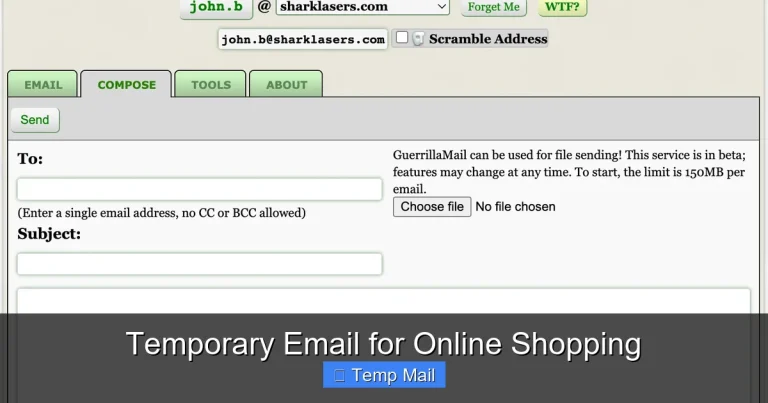
The vast majority of these services are receive-only. You cannot compose an email from the disposable address. This is by design. It prevents the service from being used to send spam or phishing emails, which would get it blacklisted instantly. The functionality is strictly for receiving verification codes, links, and small attachments. If you need to send an email anonymously, you must use a different, more sophisticated tool like an encrypted webmail service.
Legal and Acceptable Use
Using a temporary email is perfectly legal. It’s a standard privacy tool. However, using it to commit fraud, evade bans on platforms, or send malicious content is, of course, illegal and against the terms of service of virtually every website. The tool itself is neutral; its ethical use depends on the user. Always respect the Terms of Service of the website you are registering with. Some sites explicitly ban disposable email domains, and they have every right to do so on their own platforms.
Choosing the Right Temporary Email Service
Not all services are created equal. With dozens available, a few key factors separate a reliable tool from a potentially problematic one.
Look for HTTPS and a Clear Privacy Policy
This is non-negotiable. The site URL must start with https://. If it’s just http://, avoid it completely. Your connection is not secure, and your temporary email activity could be intercepted. Also, take 30 seconds to skim the privacy policy. It should state clearly that they do not collect personal data, do not log IP addresses (or log them minimally and delete quickly), and do not sell user data. Transparency is a good sign.
Inbox Lifespan and Customization
How long does the inbox last? The standard is 24 hours, but some offer 48, 72, or even a week. Consider your use case. For a quick download, 1 hour might be enough. For a 7-day software trial, you’ll need at least a 7-day inbox. Some services let you extend the time or “refresh” the address to get a new lifespan. Also, check if you can customize the email alias (e.g., change “xyz123” to “myproject”). This can make managing multiple temporary addresses easier.
Ad Experience and User Interface
Since most are free, they display ads. A good service has non-intrusive, static ads that don’t interfere with copying your email address or clicking links in your inbox. A bad one has pop-ups, auto-playing videos, and misleading download buttons. The interface should be clean, with a large, easy-to-copy email field and a simple inbox list. Test a few providers; you’ll quickly learn which ones respect the user experience.
API Access for Developers
If you’re a developer testing an app’s email system, look for services that offer an API. This allows you to programmatically generate addresses and fetch emails, automating your testing workflow. This is a more advanced feature but a hallmark of a professional-grade service.
Red Flags to Avoid
Steer clear of services that ask for a CAPTCHA on every page load, have aggressive ad placements that mimic site content, or have no clear information about data handling. Also, avoid any service that promises “permanent” disposable emails—the entire value is in the automatic expiry. If it’s permanent, it’s just another regular email account, often with worse security.
Conclusion: Embrace Controlled, Clean Inboxes
Temporary email instant access is more than a convenience; it’s a fundamental tool for modern digital hygiene. It represents a shift from a paradigm of “give everything away for free access” to one of “minimal necessary disclosure.” In a world where your email address is a key that unlocks your digital identity and a target for relentless marketing, reclaiming control over when and where you share it is empowering.
By integrating this simple step into your routine—generating a disposable address for any non-critical sign-up—you build an invisible shield around your primary communication channel. You reduce spam, lower your risk in data breaches, and simplify your online life. The process takes seconds, requires no commitment, and costs nothing. It’s a no-brainer for the privacy-conscious user, the busy professional, the curious tester, and anyone tired of a cluttered inbox. The next time a website asks for your email, pause. Ask yourself: “Is this relationship worth my real email?” If the answer is no, a world of temporary email instant access awaits, ready to protect your privacy without slowing you down.
Frequently Asked Questions
Is using a temporary email safe and secure?
Yes, for its intended purpose of receiving non-sensitive verification emails and links. Reputable services use HTTPS encryption. However, the inboxes are publicly accessible by anyone who knows the address, so never use them for private communications, passwords, or financial information.
How long does a temporary email address last?
It varies by provider, but most standard inboxes expire after 24 hours. Some services offer longer durations like 48 or 72 hours, and a few allow you to manually extend the time. The address and all contained emails are permanently deleted upon expiry.
Can I send emails from a temporary email address?
Almost never. These services are designed as receive-only tools to prevent spam and abuse. You cannot compose or send emails from the disposable address. Its sole function is to receive messages like verification codes or download links.
Is my IP address or location tracked when I use one?
All web services log IP addresses temporarily for security and analytics. A trustworthy provider will state in its privacy policy that these logs are deleted quickly (within hours or a day) and are not linked to any personal information since no account exists. For maximum anonymity, you could use a temporary email within a private browsing window or with a VPN.
Is it legal to use a temporary email?
Absolutely. Using a disposable email address is a legal and common privacy practice. It becomes illegal only if you use it to commit fraud, evade legal bans, or send threatening/harassing content. Websites can also legally block disposable email domains from their sign-up forms.
What should I do if I need an email for longer than a few days?
If you anticipate needing long-term access to an account (like a primary cloud storage or social media profile), you must use a permanent email address you control. Temporary email is strictly for short-term, low-stakes interactions. For anything you need to access months later, a standard email provider is required.