Temporary Email for Online Shopping
Using a temporary email for online shopping is a smart privacy hack. It gives you a disposable address to sign up for stores, newsletters, or discounts without using your real email. This keeps your primary inbox clean from spam and reduces the risk of data breaches linking back to you. While not for critical accounts, it’s perfect for one-time purchases and deal hunting.
Ever felt that slight pang of hesitation before entering your email on a sketchy-looking shopping site? You’re not alone. That little voice asking, “Is this safe?” or “Will this just fill my inbox with junk?” is a totally valid concern in today’s digital marketplace. What if I told you there’s a simple, free tool that lets you shop, hunt for deals, and snag discounts without ever risking your primary email address? Enter the world of the temporary email—your secret weapon for a cleaner, safer, and more private online shopping experience.
Think of a temporary email as a digital burner phone. It’s a fully functional email address you can use for a specific, short-term purpose, and then watch it vanish into the ether. For the savvy online shopper, this isn’t just a trick; it’s a fundamental part of a solid privacy strategy. In this guide, we’ll walk through exactly how these disposable inboxes work, why they’re a game-changer for deal-seekers, the potential pitfalls to watch for, and the smartest ways to use them. Let’s dive in and reclaim control of your digital footprint.
Key Takeaways
- Temporary email is a disposable address: It exists for a short time (minutes to hours) and self-destructs, leaving no trace.
- Primary benefit is spam prevention: Your real email never gets exposed to retailers or data-leaking marketing lists.
- Enhances online privacy and security: Reduces the digital footprint tied to your identity, making targeted attacks harder.
- Not for critical accounts: Avoid using it for banking, main cloud storage, or any service requiring long-term access or password recovery.
- Some websites block disposable emails: Major platforms like Amazon or PayPal often detect and reject known temp-mail domains.
- Use a reputable provider: Choose services that don’t log IPs and offer easy inbox access without registration.
- Combine with other security tools: Use a password manager and VPN alongside temp mail for layered protection.
📑 Table of Contents
- What Exactly Is a Temporary Email Service?
- The Major Benefits: Why Shoppers Are Making the Switch
- How to Use Temporary Email for Shopping: A Step-by-Step Guide
- The Crucial Caveats: Risks and Limitations You Must Know
- Best Practices: How to Be a Smart, Safe Temp Mail User
- The Future of Privacy: Where Do Disposable Emails Fit In?
- Conclusion: Embrace Smart, Selective Shopping
What Exactly Is a Temporary Email Service?
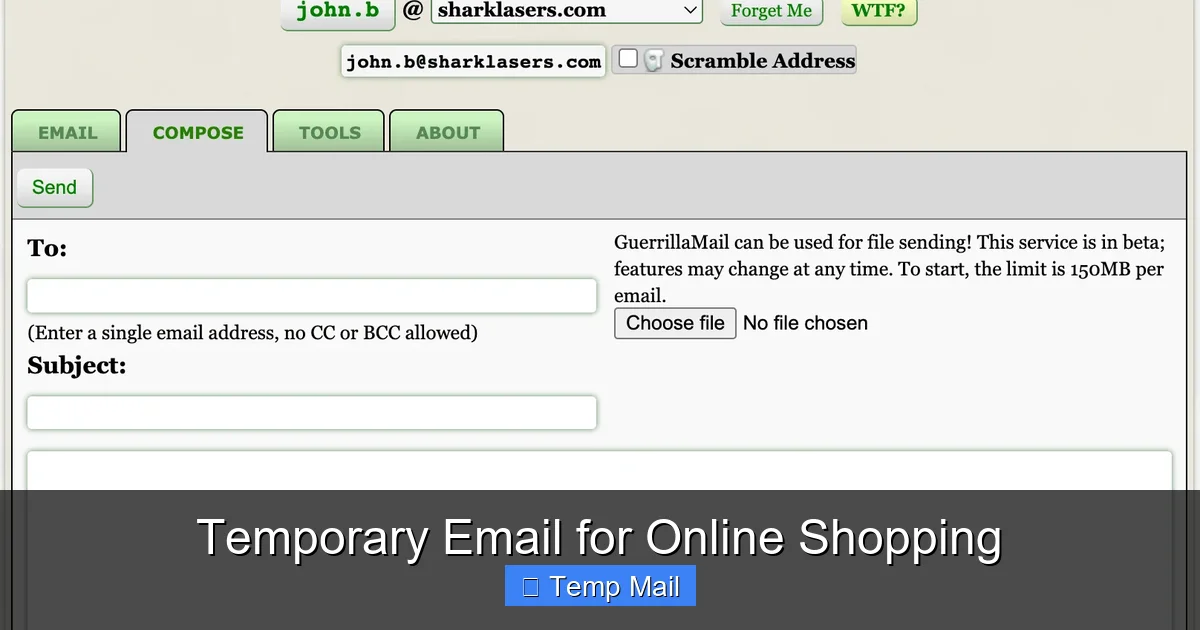
At its core, a temporary email service provides you with a random, working email address that you don’t have to register for. The service generates the inbox on the fly, assigns you a random address (like s3cure_sh0pper@tempmail.demo), and gives you a limited time—usually 10 minutes to 48 hours—to use it. During that window, you can receive emails and often view them right on the service’s website. Once the timer expires, the address and all its messages are permanently deleted.
How It Differs From Your Regular Email
Your personal Gmail, Outlook, or Yahoo account is a persistent identity. It’s tied to your name, your phone number for recovery, your contacts, and years of history. When you use it to sign up for a store’s newsletter, that company now has a direct, permanent line to you. They can sell that data, suffer a breach that leaks it, or bombard you with promotions forever.
A temporary email for online shopping is the opposite. It’s anonymous, isolated, and ephemeral. There’s no name, no recovery phone, and no long-term storage. Its sole purpose is to act as a receptacle for a single transaction or sign-up. You use it, you get the coupon code or order confirmation, and then you move on. No strings attached.
The Major Benefits: Why Shoppers Are Making the Switch
So, why go through the extra step of using a temp mail service? The benefits stack up quickly, especially if you’re a frequent online shopper or deal hunter.
Visual guide about Temporary Email for Online Shopping
Image source: testingdocs.com
1. Slash the Spam Deluge
This is the most immediate and satisfying benefit. How many times have you bought one item from a new website only to be subscribed to a dozen daily emails you never wanted? That’s because, legally, by providing your email for a purchase, you’re often opt-ing into marketing communications. With a disposable address, that spam goes to an inbox that will self-destruct. You get the order receipt, you read it, and the inbox disappears. No unsubscribe links needed. Your primary inbox remains pristine.
2. Fortify Your Privacy and Reduce Data Trails
Every website you sign up for becomes another data point in your digital profile. These profiles are built, sold, and used for targeted advertising. They can also be targets for hackers. By using a temporary email, you create a wall between your real identity and the commercial entities you interact with. If that retailer suffers a data breach, the leaked email address is useless to criminals because it’s not linked to your other accounts, your bank, or your social media. It’s a simple but powerful way to compartmentalize your online life.
3. Bypass Mandatory Sign-Ups for Discounts
Let’s be honest: many “exclusive discounts” or “first-time buyer” codes require an email sign-up. Some shoppers create a dedicated “junk email” for this purpose, but that still requires maintenance and eventually fills up. A temp mail service lets you instantly generate an address, grab the code, apply it at checkout, and forget about it. No need to remember another password or manage another inbox. It’s frictionless deal hunting.
4. Test Websites and Services Risk-Free
Are you unsure about a new, unfamiliar marketplace? Using a disposable email lets you create an account and browse its offerings without committing your primary contact. You can test the user experience, check for hidden fees, and see the quality of customer service emails before deciding whether to trust the platform with your real information.
How to Use Temporary Email for Shopping: A Step-by-Step Guide
Ready to try it? The process is remarkably simple, but doing it right ensures you get the benefits without the headaches.
Visual guide about Temporary Email for Online Shopping
Image source: pureimagesigns.com
Step 1: Choose a Reputable Provider
Don’t just Google “temp mail” and click the first ad. Stick with well-known, established services that are transparent about their practices. Look for providers that:
- Do not require registration to get an address.
- Have a clear privacy policy stating they don’t log IP addresses or message content.
- Offer a reasonable lifespan (at least 1-2 hours for shopping).
- Allow you to manually refresh to get a new address if needed.
Popular options include Temp-Mail.org, 10MinuteMail, and Guerrilla Mail. I often keep two different providers bookmarked in case one is blocked by a particular website.
Step 2: Generate Your Inbox
Visit the provider’s website. Instantly, you’ll be shown a random email address and a countdown timer. Copy that address to your clipboard. You don’t need a password; the inbox is accessible from that same browser tab as long as you keep it open.
Step 3: Use It at Checkout or Sign-Up
Proceed to the online store as usual. When asked for an email, paste your disposable address. Complete your purchase or newsletter sign-up. If the site sends a confirmation email or a digital coupon, it will arrive in the temp mail inbox you have open.
Step 4: Retrieve What You Need and Walk Away
Check the inbox tab. You’ll see the incoming email. Click it to view the contents. Copy any coupon codes, save the order confirmation number (screenshot it for safety!), and note the expected delivery details. Once you have the information you need, you can simply close the browser tab. The address and all its history are gone forever. No cleanup required.
The Crucial Caveats: Risks and Limitations You Must Know
A temporary email is a powerful tool, but it’s not a magic shield for all your online activities. Using it blindly can cause real problems.
Visual guide about Temporary Email for Online Shopping
Image source: lalargenius.weebly.com
Inability to Recover Accounts
This is the biggest risk. If you use a temp mail to sign up for an account where you might need to reset your password, you will be locked out forever. The password reset link will be sent to an inbox that no longer exists. Never use disposable email for:
- Banking or financial services.
- Primary cloud storage (Google Drive, iCloud).
- Main social media accounts.
- Any service where long-term access is critical.
Stick to using it only for transactional, one-off interactions like a single purchase or a one-time discount.
Website Blocks and Detection
Many major e-commerce platforms and services actively maintain lists of known disposable email domains and block them at the sign-up page. You might try to use a temp mail on Amazon, eBay, or PayPal and get an error message saying the email is invalid. This is a security measure to prevent fraud and spam. You must be prepared for this and have a backup plan (like using your real email for those specific, trusted giants).
No Long-Term Storage or Access
By design, these inboxes are temporary. If you close the browser and need to reference an email sent 30 minutes ago, it’s likely gone. Always screenshot or save important order confirmations and receipts to your device immediately. Do not rely on the temp inbox as an archive.
Potential for Misuse and Reputation
Because they are anonymous, temporary emails are sometimes used for fraudulent activity or abuse. While using one for legitimate shopping is perfectly fine, be aware that if a retailer is constantly bombarded with sign-ups from disposable domains, they may implement stricter blocks that affect all users.
Best Practices: How to Be a Smart, Safe Temp Mail User
To get the most out of this tool without falling into pitfalls, follow these golden rules.
The “One-and-Done” Rule
Treat a temporary email like a single-use ticket. Use it for one specific interaction on one specific website. Do not use the same temp address across multiple stores. If you do, you’re creating a link between those retailers through that shared disposable address, which slightly undermines the privacy benefit. Generate a fresh one for each new site or promotion you’re targeting.
Never Use for Account Creation on Vital Services
I said it before, but it bears repeating: your email is your master key to the internet. For any service you care about keeping long-term, use your real, secure, primary email with a strong, unique password managed by a password manager. Reserve the temp mail for low-stakes, low-commitment interactions.
Combine With a VPN for Maximum Anonymity
While the temp mail hides your email identity, your IP address is still visible to the website you visit. For users seeking high anonymity, using a reputable VPN service in conjunction with a disposable email creates a much stronger privacy shield. The site sees a VPN server’s IP and a throwaway email, making it nearly impossible to trace the activity back to you personally.
Have a Dedicated “Real” Email for Shopping, Too
Consider creating a separate, free email account (like a new Gmail) that you use *only* for online shopping and newsletters from retailers you trust and frequent. This is a middle ground between your primary personal email and a fully disposable one. It keeps your main inbox clean but allows for password recovery and order tracking from your favorite stores. Use the temp mail for everything else—the one-off shops, the suspicious deal sites, the quick sign-ups.
The Future of Privacy: Where Do Disposable Emails Fit In?
The rise of temporary email services is a direct response to the broken data economy of the modern web. As consumers become more aware of how their personal information is harvested and monetized, tools that offer control and anonymity will only grow in popularity.
We’re seeing this reflected in legislation like GDPR and CCPA, which give users more rights over their data. Temp mail is a grassroots, user-driven solution that predates much of this regulation and will likely persist as a complementary tool. However, the cat-and-mouse game with retailers will continue. Expect more sophisticated blocking and, in response, more advanced disposable email services that mimic real email patterns better.
Ultimately, the temporary email for online shopping represents a philosophy: you should be able to engage in commerce and access information online without being forced to sacrifice your privacy or be subjected to a lifetime of marketing. It’s a tool for the conscious consumer, the deal hunter who values their inbox peace, and anyone looking to reduce their digital attack surface. Used wisely, it’s an indispensable part of a modern, security-aware digital life.
Conclusion: Embrace Smart, Selective Shopping
Online shopping doesn’t have to mean a compromise between convenience and privacy. By strategically incorporating a temporary email service into your routine, you draw a clear line in the sand. You protect your primary identity from spam, data brokers, and potential breaches associated with the myriad of small online stores you browse. You reclaim your inbox as a space for important communications, not a dumping ground for promotional noise.
Remember the core principle: use disposable emails for low-commitment, transactional interactions. Never use them for accounts where access and recovery are paramount. Pair this habit with a strong, unique password for your important accounts and consider a VPN for added anonymity. This layered approach transforms you from a passive data subject into an active manager of your digital footprint. So next time you’re about to snag a 20% off code from a new boutique, reach for a temp mail. Your future, less-spammed self will thank you.
Frequently Asked Questions
Is using a temporary email for shopping actually safe?
Yes, it’s safe for the specific purpose of receiving a single order confirmation or coupon code. The safety comes from its isolation—it doesn’t connect to your other accounts. The risk is only if you later need to access that account (e.g., for a password reset), which you can’t.
Will I still receive my order confirmation if I use a temp email?
Absolutely. The store sends the confirmation to whatever email you provided. As long as you have the temporary inbox open during the short validity window, you will receive and can view the email. Always screenshot or save the confirmation details immediately.
Can I use the same temporary email address for multiple purchases?
You shouldn’t. The address will expire. Even if you get a new one from the same provider, using different addresses for different sites maintains better privacy by preventing those sites from knowing they are linked to the same person.
What’s the difference between a temporary email and a dedicated “junk” email account?
A dedicated junk email is a permanent account you maintain. It still requires a password, can be recovered, and will eventually fill with spam. A temporary email requires no setup, no password, and self-destructs, leaving zero maintenance and no long-term data storage.
What happens if I need to return an item and the store emails the return label to the temp email?
This is a critical scenario. If the return window extends beyond the life of the temp email (which it almost certainly will), you will not receive the email. Always check a store’s return policy before using a disposable email. For items you may need to return, use your real or dedicated shopping email instead.
Do major retailers like Amazon or Target accept temporary emails?
Most major, established platforms actively block known disposable email domains to prevent fraud and ensure account recoverability. You will likely be unable to create an account or checkout with a temp email on these sites. They are best used for smaller, independent online stores, deal sites, and newsletter sign-ups for one-time discounts.